LiteLLM on Embedded Linux: Orchestrating Lightweight LLMs at the Edge (2026)
In 2026, running language models on embedded systems is no longer a theoretical exercise—it is a practical necessity for edge computing applications. From industrial IoT gateways to smart retail devices, the demand for local inference has never been higher. I have spent the last year deploying LiteLLM on various embedded Linux setups, and I am going to walk you through the architectural shift, deployment pipeline, and optimization strategies that make this possible.
The Architectural Shift: Why an LLM Gateway Matters on Embedded Systems
When I first started working with LLMs on resource-constrained devices, my instinct was to call Ollama directly from the application. That approach works initially, but it creates maintenance nightmares as deployments scale. Here is why I switched to LiteLLM as a gateway layer.
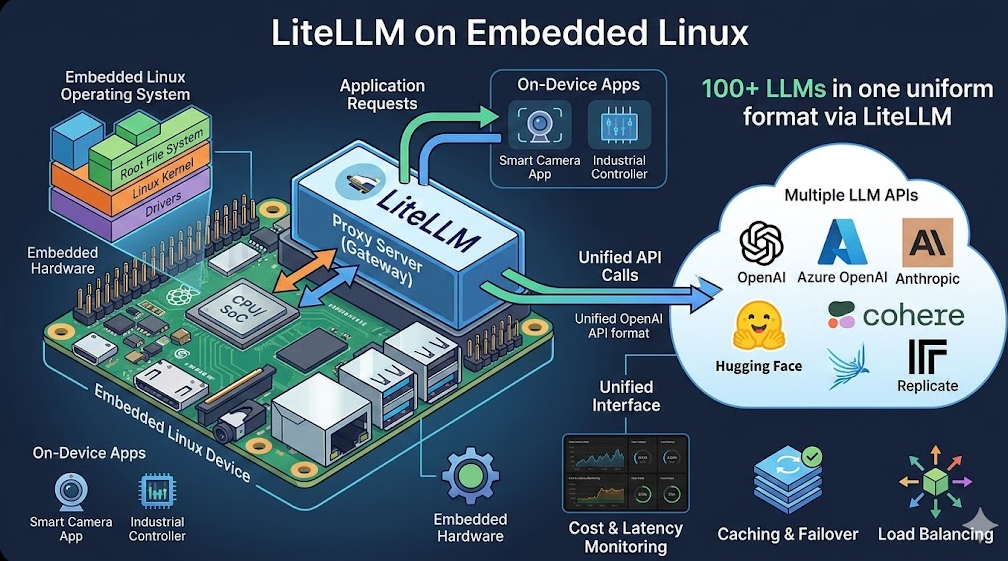
Direct calls to Ollama require hardcoding endpoint URLs, managing retry logic, and handling API format changes in every client application. On embedded systems where storage and compute are precious, this duplication is wasteful. LiteLLM acts as a unified abstraction layer that accepts OpenAI-compatible requests and translates them to whatever backend you are running—Ollama, vLLM, or even cloud endpoints for hybrid deployments.
For embedded Linux specifically, the gateway pattern provides three concrete advantages. First, it decouples your application logic from the model serving layer, meaning you can swap out the underlying model without touching client code. Second, it provides built-in rate limiting and request pooling, which is critical when your device has 8GB of RAM and you cannot afford memory spikes from concurrent requests. Third, it gives you a single point of instrumentation for logging, metrics, and debugging—something you cannot achieve with direct API calls.
The architectural decision is straightforward: if you are deploying LLMs in production on embedded hardware, a gateway is not optional. It is the foundation that makes your system maintainable.
Step-by-Step Deployment: LiteLLM Proxy with Ollama
Let me walk you through the exact deployment pipeline I use on Debian-based embedded systems. I assume you have a device running Linux with at least 4GB of available RAM and Python 3.7 or higher.
Step 1: Prepare the Virtual Environment
Never install LiteLLM system-wide on an embedded device. Use a virtual environment to isolate dependencies and avoid conflicts with system packages.
sudo apt-get update
sudo apt-get install python3-pip python3-venv -y
python3 -m venv ~/litellm_env
source ~/litellm_env/bin/activate
This creates an isolated Python environment in your home directory. The virtual environment keeps your system clean and allows you to pin specific LiteLLM versions without affecting other applications.
Step 2: Install LiteLLM
Install the LiteLLM package along with its proxy component:
pip install 'litellm[proxy]'The proxy component is essential—it launches the HTTP server that exposes the OpenAI-compatible endpoints your applications will call.
Step 3: Configure LiteLLM
Create a configuration file that maps model names to backend endpoints. I store mine in ~/litellm_config/config.yaml:
model_list:
  - model_name: codegemma
    litellm_params:
      model: ollama/codegemma:2b
      api_base: http://localhost:11434
This configuration tells LiteLLM to route requests for the model named “codegemma” to the Ollama instance running locally on port 11434. You can add multiple models to this list by repeating the structure.
Step 4: Serve Models with Ollama
Install and run Ollama to serve your models:
curl -fsSL https://ollama.com/install.sh | sh
ollama pull codegemma:2b
The pull command downloads the model to your device. On an embedded system with limited bandwidth, this is a one-time operation. Once downloaded, the model stays local.
Step 5: Launch the LiteLLM Proxy Server
Start the LiteLLM proxy with your configuration:
litellm --config ~/litellm_config/config.yamlThe proxy server starts on port 4000 by default. Your applications now have a consistent API endpoint to call, regardless of what model is running underneath.
Step 6: Test the Deployment
Verify everything works with a simple Python test script:
import openai

client = openai.OpenAI(api_key="anything", base_url="http://localhost:4000")

response = client.chat.completions.create(
    model="codegemma",
    messages=[{"role": "user", "content": "Write a Python function to calculate the nth Fibonacci number."}]
)

print(response.choices[0].message.content)
Run this script with your virtual environment activated. If you see a response, your deployment is functional.
Model Comparison for Embedded Use
Choosing the right model for your embedded Linux device is a balance between capability and resource consumption. Here is a comparison table I use when scoping projects:
| Model | Parameters | Model Size (approx.) | RAM Requirement | Best Use Case |
|---|---|---|---|---|
| TinyLlama | 1.1B | ~700MB | 2-3GB | General-purpose chat, lightweight NLP tasks |
| codegemma:2b | 2B | ~1.3GB | 3-4GB | Code generation, technical assistance |
| MobileBERT | 25M | ~100MB | 300-500MB | Text classification, sentiment analysis, NER |
| DistilBERT | 66M | ~250MB | 500MB-1GB | Question answering, semantic similarity |
| MiniLM | 33M | ~130MB | 300-500MB | Fast inference, embedding generation |
On an 8GB embedded system, you have flexibility. I typically run TinyLlama or codegemma:2b for chat-oriented applications, while MobileBERT or DistilBERT go into devices that need to run multiple services alongside the LLM.
Optimization Strategies for Resource-Constrained Devices
Deployment is only half the battle. Keeping an embedded system running reliably under load requires deliberate optimization. Here are the techniques I apply to every production deployment.
Limiting Response Tokens
The max_tokens parameter is your first line of defense against memory exhaustion. By default, models can generate lengthy responses that consume significant RAM during generation. I set max_tokens conservatively based on the use case:
response = client.chat.completions.create(
    model="codegemma",
    messages=[{"role": "user", "content": "Explain quantum computing in one sentence."}],
    max_tokens=100
)
For a code assistant, 500 tokens is reasonable. For a simple query-response bot, 100-200 tokens is sufficient. This single parameter reduces peak memory usage by preventing the model from generating unbounded output.
Request Pooling and Concurrency Limits
Embedded devices cannot handle arbitrary levels of concurrent requests. LiteLLM provides the max_parallel_requests parameter to limit how many requests process simultaneously:
litellm --config ~/litellm_config/config.yaml --num_requests 3I typically set this between 2 and 5, depending on the available RAM and the model size. If your device has 8GB and you are running a 2B parameter model, you can safely handle 3-4 concurrent requests. Push it higher only if you have measured headroom.
Memory Pressure Management
On an 8GB system running LiteLLM, Ollama, and other services, memory pressure is a real concern. I implement three practices to keep things stable.
First, I disable model preloading in Ollama by setting OLLAMA_KEEP_ALIVE to a short duration. This unloads models from RAM after a period of inactivity:
export OLLAMA_KEEP_ALIVE=5mSecond, I configure swap space on the embedded device. Even with 8GB of physical RAM, having a modest swap partition prevents OOM killer from terminating LiteLLM during memory spikes:
sudo fallocate -l 2G /swapfile
sudo chmod 600 /swapfile
sudo mkswap /swapfile
sudo swapon /swapfile
Third, I set up a simple watchdog script that monitors memory usage and restarts LiteLLM if it exceeds a threshold. This is a last-resort measure, but it has saved me from frozen devices in production.
Logging and Monitoring
LiteLLM includes built-in logging that helps you track request latency and error rates. I enable JSON logging to a file and ingest it into a monitoring dashboard:
litellm --config ~/litellm_config/config.yaml --detailed_logging 2>&1 | tee /var/log/litellm.logOn embedded systems, disk space is limited, so I rotate logs daily using logrotate and keep only seven days of history.
Production Considerations
Before you deploy to production, address two additional concerns. Security is paramount—LiteLLM does not enforce authentication by default. I run it behind a firewall that restricts access to the local network, and I add basic API key validation through LiteLLM’s configuration if remote access is necessary.
For high availability, I configure systemd service files to auto-restart LiteLLM and Ollama if they crash. This matters in embedded deployments where physical access to the device is difficult.
Conclusion
LiteLLM transforms embedded Linux from a simple controller into a capable edge AI platform. The gateway architecture gives you abstraction, observability, and control—three properties that are non-negotiable in production deployments. Combined with lightweight models like TinyLlama or codegemma:2b and disciplined optimization of max_tokens and concurrency limits, you can run responsive language model inference on devices with 8GB of RAM or less.
The stack is mature, the tooling is solid, and the performance is sufficient for real-world applications. If you are building edge AI products in 2026, this is the foundation you should be using.
Related: How to Fix Linux Menu Icons for Portable Electron Apps.
Related: “ESP32 Gesture Recognition: Edge AI with TensorFlow Lite Micro”.
Discover more from Susiloharjo
Subscribe to get the latest posts sent to your email.