Home Assistant: A Smart Solution for Your Home

home assistant

About Home Assistant Home Assistant is a software platform that allows you to control and automate your smart devices at home. Home Assistant is open source, which means you can customize it to suit your needs and preferences. Home Assistant works with over a thousand devices and services, from lights, cameras, thermostats, sensors, media players, … Read more

5 Common Internet Security Threats

internet security

Internet security is the practice of protecting your online activities and transactions from various threats, such as hacking, phishing, malware, ransomware, and identity theft. These threats can damage your data, compromise your privacy, and harm your devices. In this article, we will explain some of the most common internet security threats and how you can … Read more

Securing your iot network at home

IoT+Security+Challenges

Installing IoT devices in the home is a fun thing to do. Installing a device to automatically turn on and off the lights seems to reduce the amount of repetitive work you do every day that you could automate. Being able to monitor something from a distance and make analyses is also a fun thing. … Read more

Popular IoT Platforms Used by Big Companies

Platform Features Scalability Number of Subscribers Companies Using Amazon AWS IoT Core – Device connectivity to the cloud – Device management – Security – Data analysis – Application development Large scale – Handles millions of devices 1 million+ Amazon, Philips, Siemens, GE Healthcare, Honeywell Google Cloud IoT – Device connectivity to the cloud – Device … Read more

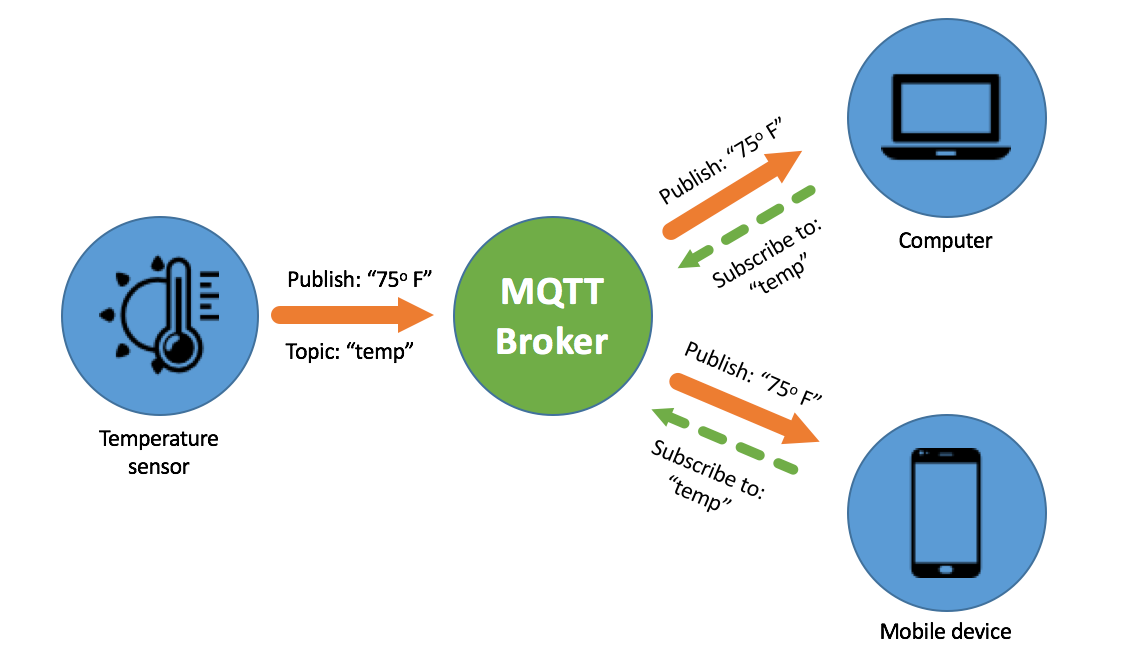
MQTT, CoAP, HTTP, and AMQP Comparison

mqtt

Feature MQTT CoAP HTTP AMQP Security – Supports security through TLS/SSL – Designed for devices with limited resources, focuses on efficiency – Security can be implemented with TLS/SSL – Provides comprehensive security mechanisms through the AMQP framework Economics – Low bandwidth and resource consumption – Efficient for devices with limited resources – Requires more resources … Read more

Install node-red via docker

Create docker volume for persistent data docker volume create –name node_red_data Run docker docker run -it -p 1880:1880 -v node_red_data:/data –name mynodered nodered/node-red backup volume node-red docker cp mynodered:/data /your/backup/directory