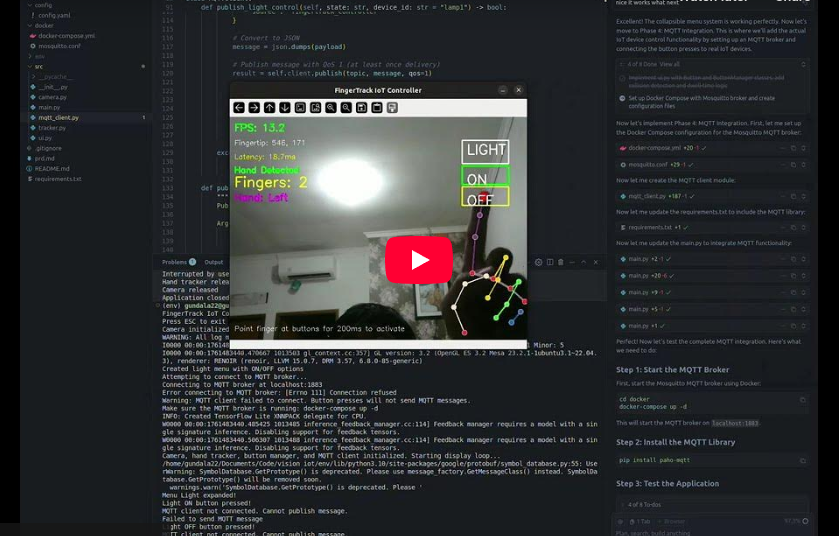
Imagine turning on your lights, switching devices, or interacting with your IoT dashboard — without touching anything.
That’s exactly what I set out to build. After a few weekends of experimenting with computer vision, edge computing, and MQTT, I’m excited to introduce the FingerTrack IoT Controller — a real-time, camera-based system that lets you control IoT devices just by pointing your finger.
This project merges AI-driven hand tracking, smart UI, and IoT integration into a single intuitive system that feels almost futuristic.
🧠 What Is FingerTrack IoT Controller?
FingerTrack is a vision-based IoT controller that uses your finger position as the main input method.
It detects where your finger points on a virtual interface displayed on screen, and when you “hold” that position for about 200 milliseconds, it triggers an action — such as sending an MQTT message to turn a light on or off.
Think of it as a virtual touch panel that doesn’t require you to touch anything.
Whether it’s switching a lamp, controlling a fan, or navigating a digital interface — everything happens through camera-based gesture control.
🧩 How It Works
The system is built around OpenCV and Mediapipe, two powerful libraries for real-time computer vision.
Mediapipe handles hand and finger detection, providing high-accuracy landmark tracking even in variable lighting.
OpenCV then processes the coordinates to detect gestures and finger positions relative to on-screen “buttons.”
When a user points their index finger at a specific button region, the system starts a 200ms timer.
If the finger remains steady during that time, it’s considered a deliberate press — preventing false triggers from quick hand movements.
Once validated, the system sends a JSON message over MQTT to control an IoT endpoint — for example:
{
  "device": "livingroom_light",
  "action": "on"
}
Everything happens locally — no cloud, no external dependencies — ensuring low latency (<100ms) and privacy.
⚙️ Tech Stack Overview
Here’s what makes FingerTrack tick:
- Computer Vision:
OpenCV for image processing + Mediapipe for landmark detection.
Achieves 20–25 FPS on a Raspberry Pi 4. - IoT Communication:
MQTT protocol for lightweight, real-time message exchange.
Easily integrates with Node-RED, Home Assistant, or custom IoT backends. - Edge Computing:
Designed to run fully on Raspberry Pi, Jetson Nano, or any Linux-based single-board computer. - User Interface:
A minimal yet interactive UI built with Python (Tkinter / PyGame layer), showing collapsible menus that expand when hovered.
For example, a “LIGHT” menu expands into ON/OFF buttons when your finger approaches. - Performance:
Real-time inference with <100ms latency and consistent 20+ FPS.
Lightweight enough to run alongside other local IoT services.
🌟 Key Features
- 🎯 Accurate Finger Tracking – Supports both left and right hands using Mediapipe’s 21-point model.
- 🤚 Gesture Recognition – Detects the number of fingers extended (0–5), allowing gesture-based triggers.
- 🧩 Smart UI Controls – Collapsible interface for minimal screen clutter.
- 🔌 MQTT Integration – Publishes structured JSON payloads to any MQTT broker.
- 💡 Visual Feedback – Color changes, progress bars, and status indicators provide instant feedback to users.
- ⚡ Offline Operation – Everything runs on local hardware — secure, fast, and independent.
🏠 Real-World Use Cases
FingerTrack is more than just a cool demo — it’s practical.
- Smart Homes:
Control lights, fans, or curtains with simple finger gestures. - Offices and Conference Rooms:
Switch slides, mute devices, or adjust lighting without physical buttons. - Interactive Displays and Exhibits:
Enable touchless interaction in public kiosks or museum installations. - Accessibility:
Provide an easier, touch-free interface for people with limited mobility.
With the growing demand for contactless control systems, especially post-pandemic, solutions like this open the door for intuitive, hygienic, and futuristic user experiences.
🧭 Development Journey
The journey began with a simple goal — capture camera input and detect finger positions.
Once that worked, I layered on logic for button regions, added time-based press validation, and eventually integrated MQTT to communicate with IoT devices.
The final step was refining the UI interaction, making it feel natural — like pressing a holographic button.
Each iteration focused on performance, UX responsiveness, and modular design so others can extend it — whether for industrial automation or creative projects.
💬 Final Thoughts
The FingerTrack IoT Controller is a small step toward natural human–computer interaction — where gestures replace traditional interfaces.
What excites me most is how accessible it is: you only need a webcam, a Raspberry Pi, and an MQTT broker to start experimenting.
If you’re passionate about computer vision, edge AI, or IoT automation, give this project a try.
You’ll see how merging these technologies can lead to something that feels straight out of Iron Man’s lab — but entirely real.
Stay tuned — I’m planning to open-source this soon with installation guides and demo videos.
Until then, keep building, keep experimenting, and let your finger do the clicking. 🖐️✨
Related: I’m Turning My Old 3D Printer Into a Pen Plotter.
Related: Building with Musk: OpenAI Control Battle in Court.
Discover more from Susiloharjo
Subscribe to get the latest posts sent to your email.